AI hallucinations about B2B software: a workflow to find and fix wrong facts in ChatGPT and other assistants
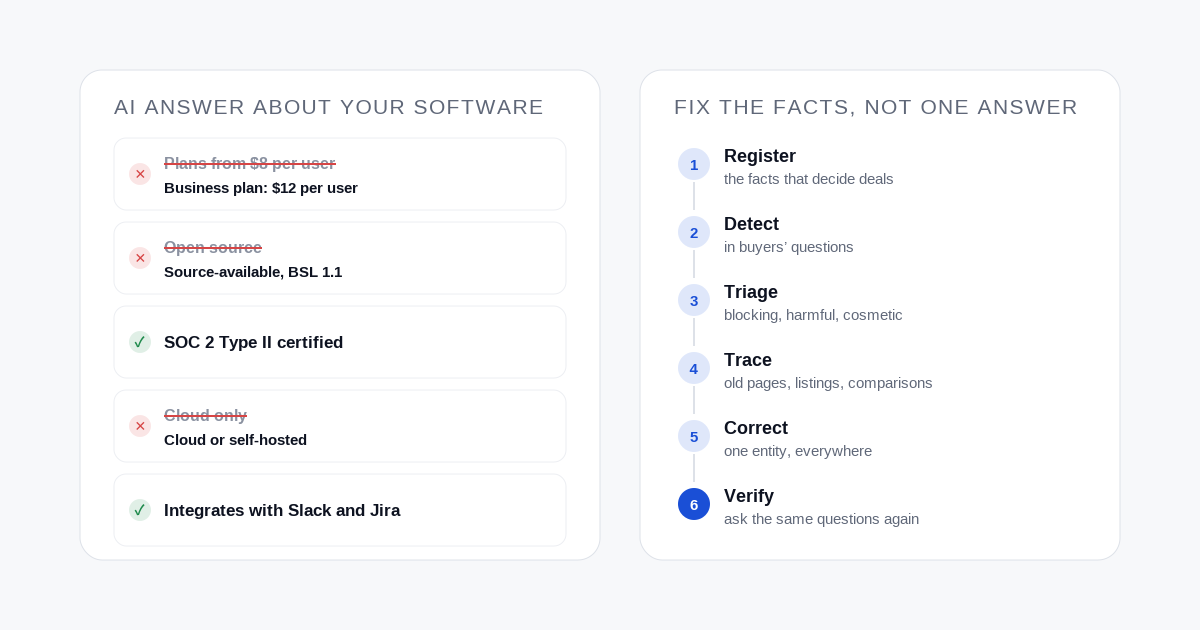
ChatGPT, Gemini and Google AI Mode tell buyers what your software costs, which plans exist, which integrations it has, whether it is SOC 2 certified and under which license it ships. When they get one of those facts wrong, the buyer often never asks you: the product is dropped from the shortlist, or a security review stalls on a claim you never made. This guide gives enterprise SEO and organic search teams a workflow to find factual errors about a B2B product in AI answers, rank them by the damage they do, trace them to their source and correct them, with owners outside the SEO team.
The short answer
- Keep a register of the facts that decide deals: plans and prices, deployment, license, certifications, data residency, integrations, limits. Each with an owner and a source page.
- Ask the assistants the questions procurement, security and engineering ask, not only "best tool for": the errors hide in specific questions.
- Triage by impact: a wrong certification or license blocks a deal; a wrong founding year does not.
- Trace before you fix. The error often starts on your own site: an old pricing page, a vague claim, a product name you changed.
- Fix the entity, not one answer: one name, one set of facts, stated in plain text and in structured data, the same on your site, your docs, your listings and the pages that describe you.
- Make it a process: every pricing, packaging or compliance change updates the register and the pages, then the answers are checked again.
Why B2B software is especially exposed
AI assistants describe a product from what they find on the web and in their training data. B2B software changes faster than those sources: plans are renamed, prices move, features change tier, a product is merged into a suite, a certification is renewed or a license changes. Each change leaves old pages behind, on your site and elsewhere, and the assistants may read the old version.
The errors also cost more than in consumer categories. A B2B buyer uses the answer to filter vendors before talking to them. A wrong "no SSO", "US hosting only" or "not open source" removes you from the list in silence. A wrong price sets an expectation your sales team then has to undo.
The errors that cost B2B deals
| Fact | Typical error | Who it stops |
|---|---|---|
| Pricing and plans | Old prices, a plan that no longer exists, a feature placed in the wrong tier | Finance, the champion building the business case |
| Security and compliance | A missing or invented SOC 2, ISO 27001 or HIPAA claim, SSO said to be absent | Security review, IT |
| License and deployment | "Open source" for a source-available license, "cloud only" for a product that can be self-hosted | Legal, engineering |
| Data residency | Hosting regions that are wrong or out of date | Procurement in regulated markets, DPOs |
| Integrations and limits | An integration you dropped, an API limit from an old plan | The technical evaluator |
| Identity | An old product name, the parent company before an acquisition, a confusion with a homonym | Everyone: the buyer may not find you at all |
The workflow in six steps
1. Build the fact register
List the facts above for each product, in one shared document: the correct value, the page of your site that states it, the owner who can confirm it, and the date it last changed. Product marketing usually owns plans and positioning, security owns certifications, legal owns the license, docs own integrations and limits. Without this register, nobody can say quickly whether an answer is wrong.
2. Ask the questions where errors show up
Write questions for each stage of an enterprise purchase, in the buyer's words: "Which wiki tools can we self-host with SSO?", "Is [product] SOC 2 Type II certified?", "Does [product] offer EU data hosting?", "How much does [product] cost for 200 users?", "Open-source alternatives to [competitor]". Ask them on the assistants your buyers use, in their markets, several times: one answer is not enough to tell an error from noise. See how to write prompts your customers ask.
Then read the answers against the register, claim by claim. General recommendation questions matter as much as direct ones: that is where the shortlist is made, and, as the example below shows, where the assistants are the least careful.
3. Triage by impact
- Blocking: security, compliance, license, data residency, or a price off by a plan. Fix within days.
- Harmful: a missing integration, a wrong limit, a competitor's feature attributed to you or the reverse. Fix in the next content cycle.
- Cosmetic: a founding year, an office count, a slightly dated description. Fix when you touch the page.
Count how often each error appears, and on which assistants. An error in one answer out of thirty is worth less than one that comes back on every update.
4. Trace each error to its source
Look at the pages cited in the answers that contain the error, then search for the wrong claim itself. In order, check:
- Your own site: old pricing or plan pages still online, blog posts announcing past features, a homepage slogan that says more than the legal terms, docs for a previous version.
- Software directories and review sites: profiles filled in years ago and never updated.
- Comparison pages, including competitors' "alternatives" pages, which describe you as you were when they were written.
- Press and partner pages from before a rename, a merger or a repricing.
Which sources AI assistants cite covers the kinds of pages that weigh most.
5. Correct the entity
The assistants see your product as an entity: a name, a company, and a set of facts that should agree everywhere. Correcting one page rarely changes the answers; making every description of the entity say the same thing does.
- State the deal-deciding facts in plain text, on pages the crawlers can read: a pricing page with every plan in HTML, a security or trust page with each certification and its date, a self-hosting page that names the license. Do not leave them in images, PDFs or behind a form.
- Say it precisely. "Open source" and "source-available under BSL 1.1" are different facts for a legal team. "SOC 2" and "SOC 2 Type II, audited yearly" too.
- Add structured data that matches the page:
OrganizationwithsameAslinks to your official profiles,SoftwareApplicationwith its offers, and thelicensewhere it applies. See structured data and content for AI citations. - Retire the old versions: redirect old plan and product pages to the current ones, and date your changelog so a reader can tell old from new.
- Update what others say: your directory and review-site profiles first, then ask publishers and partners to correct dated claims. See digital PR for AI visibility.
- Use one name. After a rename or an acquisition, say once, clearly, "formerly X", and use the new name everywhere else.
6. Verify, then make it a process
Ask the same questions again after each update and record which errors are gone. Answers based on live search can change within days; facts that come from a model's training data take longer. Then build the check into your releases: any change of price, plan, certification or license updates the register, the pages and the profiles, and adds the related questions to the ones you track. Report the open errors by severity next to your AI visibility figures, so the work is seen.
A worked example: how AI describes Outline's license
In our study of team wiki software in the US, we asked ChatGPT, Gemini and Google AI Mode 12 questions engineering and product teams ask, on October 28, 2026 (36 answers). Outline, a team wiki that can be self-hosted, is named in 18 of them. Its license is the kind of fact a legal or engineering team checks: the code is published under the Business Source License 1.1, which allows any use except offering it as a competing document service, and which becomes the Apache License 2.0 on October 23, 2030. That makes it source-available, not open source in the sense of the Open Source Initiative.
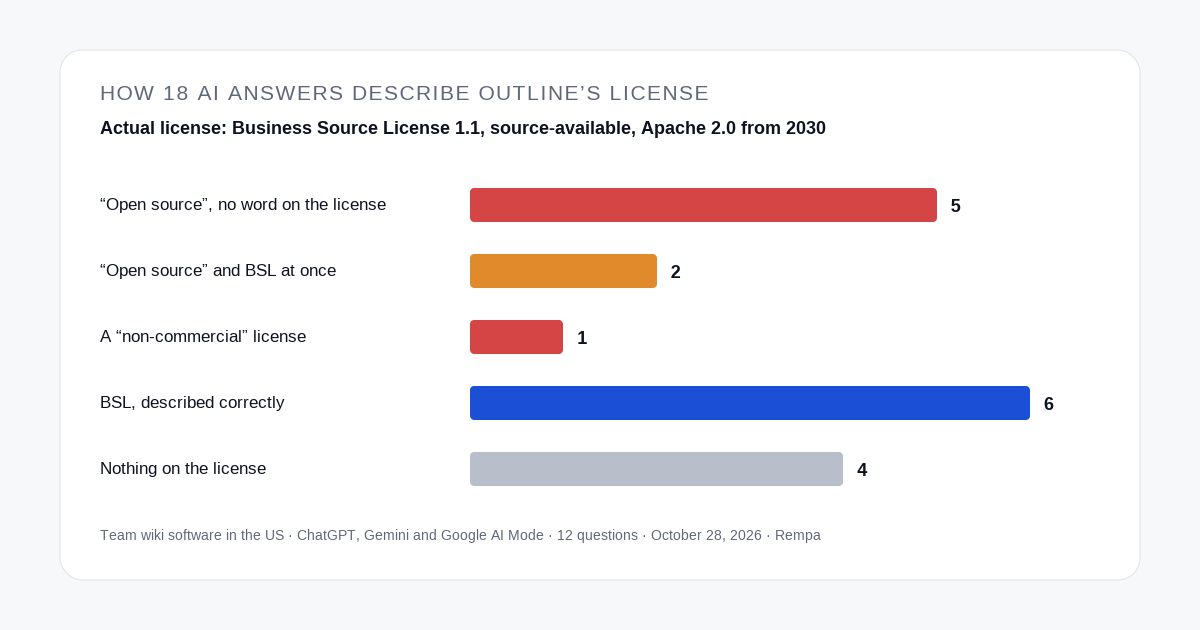
| What the answer says about the license | Answers |
|---|---|
| "Open source", no word on the license | 5 (3 Gemini, 1 ChatGPT, 1 Google AI Mode) |
| "Open source" and BSL in the same breath | 2 (Gemini) |
| A "non-commercial" license | 1 (Google AI Mode) |
| BSL, described correctly | 6 (2 each on ChatGPT, Gemini and Google AI Mode) |
| Nothing on the license | 4 |
What the analysis shows:
- The error depends on the question. Five of the six correct answers come from questions about licenses, self-hosting or data ownership, such as "Which knowledge base tools offer both cloud hosting and a self-hosted open-source version?". The "open source" labels come from general questions such as "What is the best modern internal wiki software for engineering and product teams?", the ones where a shortlist is made. One Gemini answer titles its section "Outline — Best Open-Source & Self-Hosted Option".
- Two errors pull in opposite directions. "Open source" is more than the license grants; "non-commercial" is less, since companies may use it commercially. A legal team reading either would get it wrong.
- The source is likely the brand itself. Outline's homepage says "10 years open source" and does not name the license. The assistants repeat the simplest wording they find.
- The fix is wording, in a few places. "Source-available under the Business Source License 1.1, Apache 2.0 from 2030" on the homepage, the pricing page and the self-hosting docs, the same in the
licenseproperty of the structured data, and on the directory profiles. Then the same questions, asked again, show whether the label changed.
This is one study of 12 questions on one day, used to show the method, and our reading of the license, not legal advice. The study page has the questions, the brands named and the sources.
Who does what
| Team | Role in the workflow |
|---|---|
| SEO and organic search | Owns the questions, the checks, the triage and the report; fixes site pages and structured data |
| Product marketing | Owns plans, prices and positioning in the register; updates directory profiles |
| Security and legal | Confirm certifications, license and data residency; approve the wording |
| Docs and engineering | Keep integrations, limits and the changelog current; retire old versions |
| Communications | Asks publishers and partners to correct dated claims |
Mistakes to avoid
- Checking only your brand name. Ask the category and comparison questions too: the errors that cost deals often appear when buyers have not named you yet.
- Correcting one answer by hand. Feedback buttons in the assistants do not fix the sources the next answer will read.
- Marketing wording that says more than the facts. "Open source", "unlimited", "enterprise-grade security": the assistants repeat it literally.
- Leaving old pages online. An old pricing page that ranks is a source the assistants may prefer to the new one.
- No owner outside SEO. The facts belong to product, security and legal; without them, corrections stall.
Tools
You need the full text of each answer, with the pages it cites, for the same questions over time and on several assistants. Rempa (our product) keeps every answer and its sources for the questions you track, across the assistants and markets you choose, and sums up after each update how the AI models describe your brand, with its strengths and weaknesses, on the Perception page. You compare the claims with your fact register; Rempa does not send automatic alerts today. See AI visibility: reducing hallucinations about your brand and our general guide to fixing AI hallucinations about your brand.
Frequently asked questions
How can enterprise search teams find factual errors about their software in ChatGPT?
Write down the facts that decide deals, ask ChatGPT and the other assistants your buyers use the questions procurement, security and engineering ask, including category questions that do not name you, and read each claim against your facts, several times and on each assistant.
Why does ChatGPT get my software's pricing or features wrong?
Because it relies on pages written before your last change, or on vague wording. Old pricing pages, directory profiles, comparison articles and your own marketing copy are the usual sources.
What is entity optimisation for AI answers?
Making every description of your product agree: one name, the same facts on your site, docs, structured data, directory profiles and the pages that describe you, stated precisely and in plain text.
Which errors should we fix first?
Those that block a purchase: security and compliance, license and deployment, data residency and prices. Then those that weaken the evaluation, such as integrations and limits.
How long until the answers change?
Answers that use live search can change within days of a correction on the cited pages. Facts that come from a model's training data can take until its next version. Check the same questions after each update.
Sources
- Rempa, Team wiki software in the US: 12 questions asked to ChatGPT, Gemini and Google AI Mode, October 28, 2026 (36 answers).
- Outline's license file in its public code repository (Business Source License 1.1, change date October 23, 2030, change license Apache 2.0) and its homepage, both read on November 10, 2026.
More from the blog
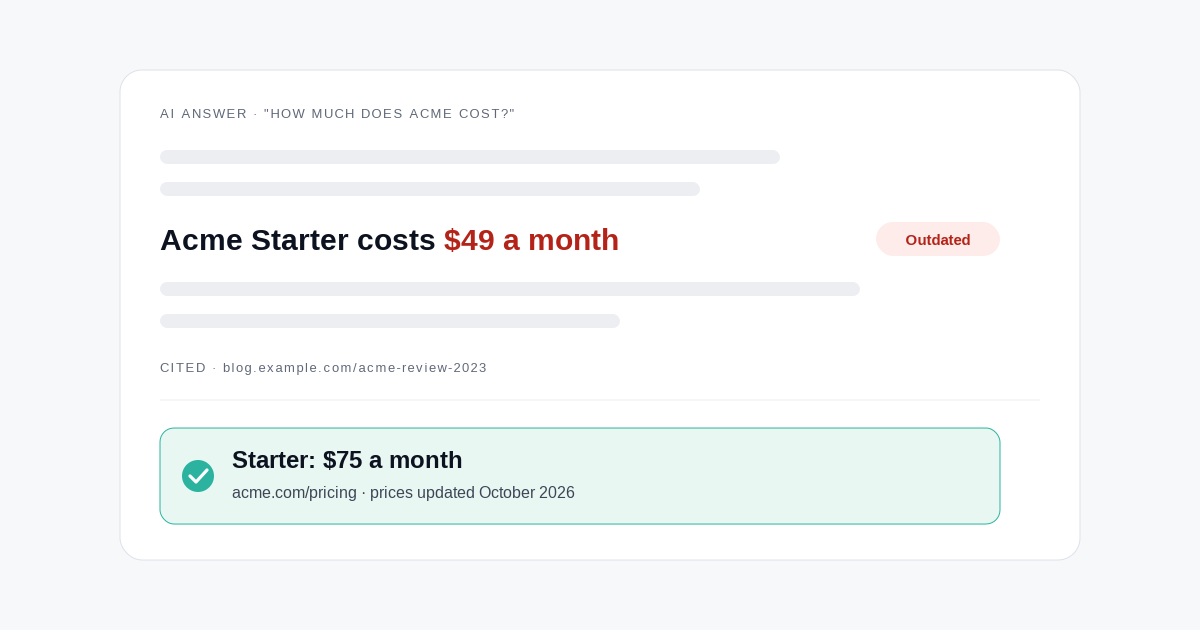
How to fix AI hallucinations about your brand: find the wrong facts, trace them, correct them
Wrong prices, invented features, a CEO who left years ago: AI assistants get brand facts wrong more often than most companies check. How to find the errors and fix them where they come from.
Read the article →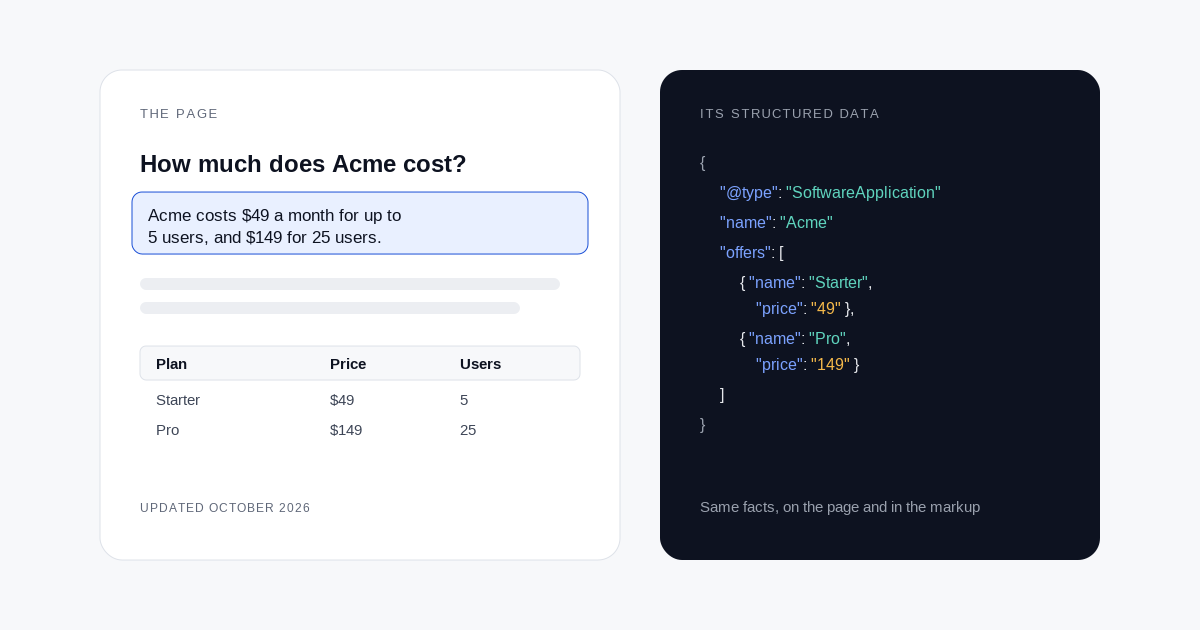
Structured data and content structure for AI citations: what helps assistants use your pages
Schema markup helps less than many guides promise; the page itself decides whether an assistant can quote it. Which structured data matters, and how to write pages AI answers cite.
Read the article →
Which sources do AI assistants cite, and how to get your brand into them
When an assistant recommends a product, it is summarizing a comparison site, a review platform or a forum thread. Find those sources and get into them.
Read the article →