Free llms.txt generator
Enter your website. We read its home page, sitemap and main pages, and write an llms.txt. Edit it, copy it, publish it at the root of your site.
- Written from your real pages, in the llms.txt format
- Legal and account pages in an Optional section, noindex pages left out
- A check of what your site is missing, and whether you already have one
Your file
What we found on your site
The llms.txt you have now
The file is the easy part. Are AI assistants naming you?
A free check asks ChatGPT, Gemini and Google AI Mode 12 questions your buyers ask, and emails you who gets named: you, or your competitors.
What an llms.txt is, and what it is not
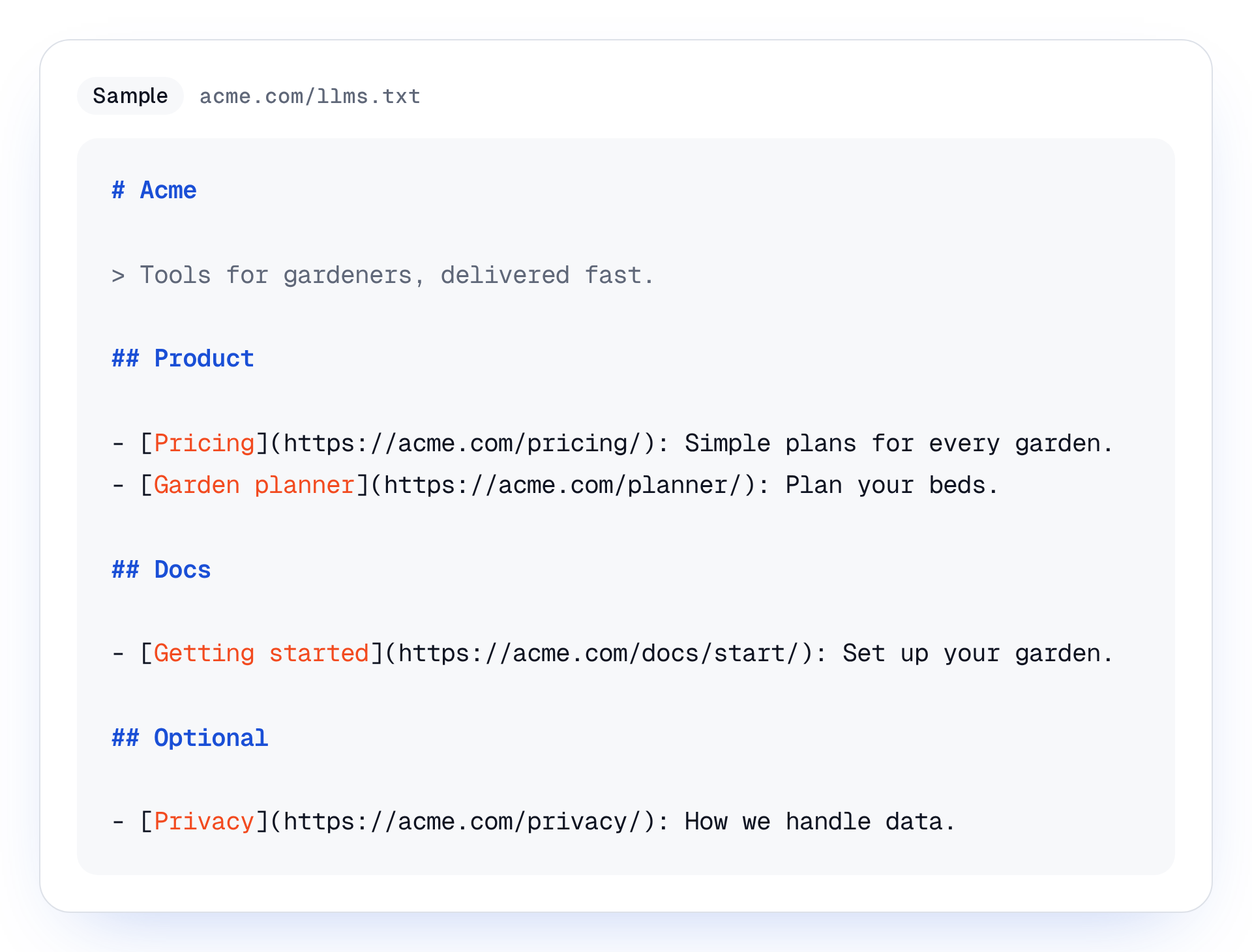
An llms.txt is a plain Markdown file at the root of a website (/llms.txt), proposed at llmstxt.org. It gives language models a short map of the site: what it is, and which pages matter, with a line on each. It is easier for a model to read than a full HTML site.
It is not a ranking factor, and it does not make AI assistants recommend you. As far as we know, ChatGPT, Gemini, Claude and Perplexity have not said that they use it to decide which sites to cite. Where it is used today is mostly by tools that read documentation, like coding assistants and agents, and by people who point an assistant at a site. It costs almost nothing to publish, and it does no harm, so it is good hygiene. What decides whether you are named is the content AI finds about you, and the sites that talk about you.
From the generator to your site
- Generate it, then read it. Remove the pages that should not be there and reword the descriptions that are weak: it is your site's pitch.
- Publish it at the root: the file must answer at
https://yoursite.com/llms.txt, as plain text. On WordPress, Shopify, Webflow and most hosts, upload it to the root or add a redirect from/llms.txtto a text file. - Check that it loads in your browser, and that your robots.txt does not block AI crawlers from the pages it lists: an llms.txt does not override robots.txt.
- Keep it current. When you add or remove key pages, generate it again.
llms.txt questions
What is an llms.txt file?
A Markdown file at the root of a website that lists its key pages with short descriptions, for language models and AI agents to read. It follows the format proposed at llmstxt.org: a title, a one-line summary, then sections of links.
Does llms.txt improve my visibility in ChatGPT or Google AI?
There is no evidence that it does. The main AI assistants have not confirmed that they read it to choose their sources. It is cheap, harmless and useful for tools that read documentation, so it is worth having, but do not expect it to change what ChatGPT says about you.
How does the generator choose the pages?
It reads your home page, your sitemap and the pages your home page links to, up to 40 pages. Pages that error, are marked noindex or have no title are left out. Pages are grouped by the first part of their address (docs, blog, pricing, about…). Privacy, terms and account pages go to an Optional section, which a reader can skip.
Where do the descriptions come from?
From each page's meta description, shortened to about 160 characters. A page without one is listed with its title only, and the tool tells you how many. Writing those descriptions is the best use of your time after generating the file.
How many files can I generate?
Three a day for each person, counted by IP address. Each request is recorded with the website entered, so that we can apply this limit. If you need more, write to contact@rempa.ai.
Do you keep my site's content?
No. The pages are read when you click, and the result is kept in memory for a short time so that the same site is not read again at once. We do not store your pages, and we do not ask for an email.
Why does the tool say some pages could not be read?
A page may have been slow, answered with an error, or blocked our reader. Check that your site is public, and generate the file again, or add the missing links to the file by hand.
What should I do after publishing it?
Find out what AI assistants say about your brand. The free GEO checker asks ChatGPT, Gemini and Google AI Mode 12 of your buyers' questions and emails you who is named. Rempa then tracks it every day and lists the fixes that matter most.
Is your brand named in AI answers?
The free GEO audit asks ChatGPT, Gemini and Google AI Mode 12 questions your buyers ask, and emails you who gets named: you, or your competitors.