How to track AI Overviews: monitoring brand citations in Google's AI answers, with tool pricing
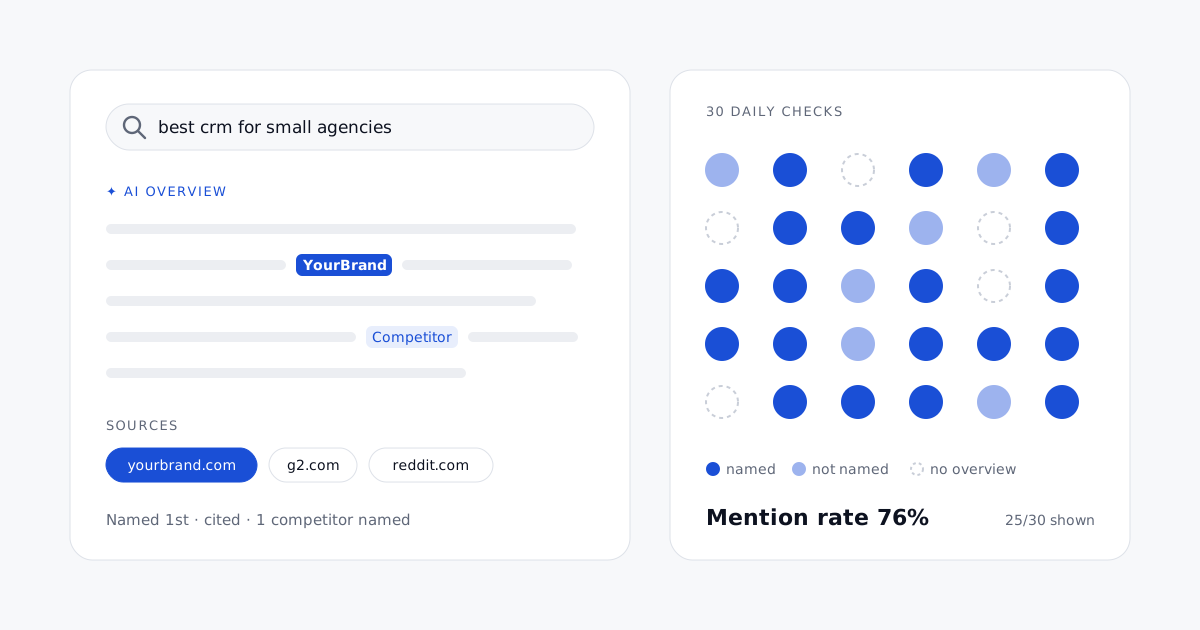
Google AI Overviews now answer a large share of searches before the first blue link, and they name a few brands and cite a few pages while doing it. Search Console will not tell you whether yours were among them. This guide explains how an SEO director can track AI Overviews properly: what to measure, how to collect it every day, how to report it, and what AI Overviews tracking costs, tool by tool and per daily check.
What "tracking AI Overviews" means
AI Overviews tracking is the regular, automated check of Google's AI summaries for a fixed set of searches, in a given market, recording what each summary says about your brand and your competitors. For each search and each day, five things are worth recording:
- Presence: did Google show an AI Overview at all? The share of your searches that trigger one is your exposure, and it moves on its own.
- Brand mention: is your brand named in the text of the summary? This is what the searcher reads, whether or not they click.
- Citation: is one of your pages among the sources linked from the summary? A mention and a citation are different events: Google often names a brand while citing a review site, and cites a vendor's page without naming the vendor.
- Position: where you appear among the brands named, first or fifth.
- Competitors and sources: which other brands are named, and which domains Google relies on. The sources are your to-do list.
Sentiment, how favorably the summary describes you, is a sixth field worth adding once the first five are in place.
Why Search Console is not enough
Google counts clicks and impressions from AI Overviews and AI Mode in Search Console's Performance report, inside the regular "Web" search type, with no filter to separate them (Google Search Central, AI features and your website). You can see that a page earned impressions, not whether it was cited in a summary, and nothing at all about mentions of your brand without a link. Yet the exposure is large: Semrush measured AI Overviews on about 16% of the queries in its 10-million-keyword sample at the end of 2025, and BrightEdge reported them on 48% of the queries it tracks in February 2026.
Classic rank trackers fill part of the gap. Many now flag whether an AI Overview appears for a keyword and whether your domain is in its links. Few read the text to tell you whether your brand is named, which competitors are named instead, and how. For a brand, that text is the result that matters.
How to track AI Overviews: a method in six steps
1. Choose the searches you will be judged on
Start from the questions that lead to a purchase in your category: "best X for Y", "X vs Y", "X alternatives", "how much does X cost", "how to do Y". AI Overviews appear more often on longer, question-style searches than on short head terms, so keep the wording buyers actually use. Fifty to two hundred searches per market is enough to read a trend; group them by topic and decision stage so you can report by group rather than by line. Our guide to writing the prompts your customers ask covers how to build the set.
2. Fix the market
One market is one language and one location. AI Overviews differ by country, and collection must exit from the target country with the right language settings. Report each market separately.
3. Pick a cadence
AI Overviews change more often than rankings: the same search can show a summary one day and none the next, with different sources. Daily checks show the volatility and let you average it out over a week. Every two or three days is enough for a stable category or a tight budget. Weekly checks miss too much to read a change after you publish a page.
4. Collect the full summary, not a flag
Store the summary text, its references and the date for every check, not only "AI Overview: yes". Brand mentions, positions and sentiment are extracted from the text, and you will want to re-read the answers when a number moves.
5. Turn checks into rates
Report rates over a period rather than single results: presence rate, mention rate (the share of AI Overviews that name you), citation share (the share of AI Overviews that link to your domain), average position, and share of voice against competitors. A single day's answer is anecdote; thirty days of answers are a measure.
6. Act on the sources
For every group of searches where competitors are named and you are not, list the domains Google cites. Each one is a page to improve or a third-party listing to obtain. Then watch the same rates in the following weeks to see whether the change worked. Our article on getting your brand into AI Overviews and AI Mode details the fixes.
Four ways to collect AI Overviews data
- By hand. A private window, the right country, a spreadsheet. Fine to explore twenty searches once; unworkable every day, and your own location and history bias the results.
- A rank tracker with an AI Overview flag. Semrush Position Tracking, Nightwatch and others mark the keywords that show an AI Overview and whether your site is among its links. Cheap if you already pay for rank tracking; it tells you about links, rarely about brand mentions in the text.
- An AI visibility tool. Otterly.AI, Profound, Peec AI, Ahrefs Brand Radar, SE Ranking's AI Search add-on, Rempa and others read the summary itself: brands named, position, sentiment and sources, usually next to ChatGPT, Gemini and Perplexity.
- A SERP API, to build it yourself. DataForSEO and SerpApi return the AI Overview as structured data (text and references). The data is cheap; the parsing, storage and reporting are your job.
AI Overviews tracking tools: pricing and cost models
Prices below were read on each vendor's official pricing page on October 15, 2026. They change often, some pages show euros in Europe, and several vendors sell only on quote. Check the current page before you buy. Rempa publishes this article and is listed with its own prices.
| Tool | What it tracks in AI Overviews | Price (list, per month) | Cost model |
|---|---|---|---|
| Semrush AI Visibility Toolkit | Brand mentions and sources for your prompts in Google AI, ChatGPT, Gemini and Perplexity; daily. Its documentation names Google AI Mode: check that AI Overviews are covered | $99 per domain with 25 prompts; +50 prompts for $60 | Per domain, plus prompt packs |
| Semrush Position Tracking | Which tracked keywords show an AI Overview, and whether your site is linked in it | Part of Semrush's SEO subscriptions | Per keyword |
| Otterly.AI | Brand mentions and cited links in AI Overviews, ChatGPT, Perplexity and Copilot; daily, 50+ countries | Lite $29 (15 prompts), Standard $189 (100), Premium $489 (400); AI Mode add-on $9 to $149 | Per prompt tier, engines as add-ons |
| Ahrefs Brand Radar | Brand mentions and citations across a ready-made index of millions of AI Overview and AI Mode answers, plus your own prompts | $199 per AI platform index, $699 for all platforms; custom prompts in packs of checks | Per platform, plus per check |
| SE Ranking AI Search | Mentions and links in AI Overviews, AI Mode, ChatGPT, Perplexity and Gemini | Add-on from $89 ($71.20 billed yearly), on top of a plan from $129 | Add-on priced by checks (1 prompt × 1 engine) |
| Nightwatch | Rank tracking with AI Overviews and AI Mode included, plus AI prompts on ChatGPT, Claude, Gemini and Perplexity; daily | €79 / €159 / €399 billed yearly (500 / 2,500 / 7,500 keywords; 50 / 150 / 500 prompts) | Keyword and prompt tiers |
| Peec AI | Mentions, position, sentiment and sources; AI Overviews is one of the 3 models you choose; daily | See the vendor's page (Starter 50 prompts, Pro 150, Advanced 350) | Per prompt tier and model |
| Rempa | Mentions, position, sentiment and cited sources; Google AI Overviews and AI Mode among the 3 models you choose, with ChatGPT, Gemini, Perplexity, Claude, Copilot | Starter $75 (50 prompts every 3 days), Pro $195 (150 prompts daily), Enterprise $395 (350 daily); −20% billed yearly | Per prompt tier |
| Profound | AI Overviews and AI Mode among up to 9 engines | Free 7-day trial (50 prompts); Enterprise on quote | Quote |
| BrightEdge, seoClarity | AI Overviews inside enterprise SEO platforms (BrightEdge AI Catalyst, seoClarity ArcAI) | Not public | Annual enterprise contract |
| DataForSEO (API) | Raw AI Overview (text, references) from the Google results; dedicated AI Mode endpoint | $0.0012 per search with the AI Overview loaded (standard queue), $0.004 live | Pay per request |
| SerpApi (API) | Raw AI Overview and AI Mode answers | 250 free searches; $25 for 1,000, $75 for 5,000, $150 for 15,000 | Monthly search quota |
The five cost models
- Per prompt or keyword tier. A plan includes N searches checked daily (Otterly, Peec AI, Rempa, Nightwatch). Predictable; watch what counts as one prompt when you add engines or countries.
- Per check. You pay per search × engine × location run (Ahrefs custom prompts, SE Ranking's add-on). Fair for irregular volumes; daily checks across several engines add up fast.
- Per domain or project, plus packs. Semrush's toolkit is priced per domain, with prompt packs on top. Agencies with many clients should multiply before comparing.
- Enterprise quote. BrightEdge, seoClarity and Profound's main plan. Usually annual, priced on domains and keyword volume, with services included.
- Pay per request. SERP APIs. The lowest cost per check by far, but you build and maintain everything else.
What a daily audit really costs
The useful unit is the price of one search checked once. Take an SEO director tracking 200 buyer searches in one market, every day: 6,000 checks a month.
| Option | 200 searches daily, per month | Per search per day |
|---|---|---|
| DataForSEO | About $7 (standard queue) to $24 (live) of data, plus the build and its upkeep | $0.0012 to $0.004 |
| SerpApi | $150 (Production plan, 15,000 searches: an AI Overview sometimes needs a second request), plus the build | $0.025 |
| Otterly.AI | $288 (Standard, 100 prompts, + a 100-prompt pack), 4 engines | $0.048 |
| Semrush AI Visibility Toolkit | $339 per domain ($99 for 25 prompts + 4 packs of 50) | $0.057 |
| Rempa | $395 (Enterprise, 350 prompts), or $315 billed yearly; 3 engines | $0.053 to $0.066 |
Two lessons. First, raw data is not the cost: a do-it-yourself tracker pays a few dollars for AI Overviews and much more in engineering time, because brand mentions, positions and sentiment must be extracted from free text, matched to the right brand, stored and charted, and the collection must be kept working when Google changes its page. Second, a SaaS price covers several engines: compare the price per search per day on the engines you actually need. If AI Overviews is the only surface that matters to you, a rank tracker's flag or a cheap API may be enough; if you also need ChatGPT and AI Mode, a single tool is cheaper than three.
How to choose
- You only need to know where an AI Overview appears and whether you are linked: use the AI Overview filter of the rank tracker you already pay for.
- You need brand mentions, competitors and sources: pick an AI visibility tool that reads the text, tracks daily, and lets you choose the country and the engines.
- You want a market-wide view without writing prompts: an index-based tool such as Ahrefs Brand Radar shows mentions across millions of existing answers.
- You have a data team and a reporting stack: a SERP API, with your own parsing, is the cheapest at scale.
- You run an enterprise SEO platform already: ask your vendor what AI Overview tracking your contract includes before buying another tool.
Whatever you choose, test it on your own twenty most important searches for a week, and compare what it reports with what you see in Google from the same country.
Frequently asked questions
How do I track AI Overviews?
Pick 50 to 200 searches your buyers type, set the market (country and language), and run them every day through a tool or a SERP API that returns the full AI Overview. Record whether an overview appears, whether your brand is named, whether your pages are cited, which competitors are named and which sources Google uses, then report the rates over weeks.
Does Google Search Console show AI Overviews?
No. Google counts AI Overviews and AI Mode clicks and impressions within the "Web" search type of the Performance report, with no filter to isolate them, and it does not report brand mentions at all.
How often should I check AI Overviews?
Daily, if you can. AI Overviews appear and disappear and change their sources from one day to the next, so a weekly check misses most of the movement. Every two or three days is a reasonable compromise for a stable category.
How much does AI Overviews tracking cost?
From about $0.001 per search per day with a SERP API (plus the cost of building the tracker), to roughly $0.04 to $0.13 per search per day with SaaS tools, which usually include several AI engines. Entry plans start around $29 to $99 a month; enterprise platforms are sold on quote.
What is the difference between being mentioned and being cited in an AI Overview?
A mention is your brand named in the text of the summary; a citation is one of your pages linked as a source. They often diverge: Google can name your brand while citing a review site, or cite your page without naming you. Track both.
Can a rank tracker track AI Overviews?
Partly. Most rank trackers now flag the keywords that show an AI Overview and whether your domain is among its links. Few read the summary text, so they cannot tell you whether your brand is named, how it is described, or which competitors are named instead.
In short
Tracking AI Overviews means checking a fixed set of buyer searches every day in each market, storing the full summary, and reporting presence, mention rate, citation share, position and sources over time. Rank trackers flag the overview; AI visibility tools read it; APIs let you build it yourself. The cost is driven by searches multiplied by checks per month: compare tools on the price of one daily check, not on the plan name.
More from the blog
How to build an enterprise GEO strategy: a framework for organic search directors
GEO at enterprise scale is a program, not a list of tactics: the questions to win, a baseline, four workstreams with owners, and the tools to measure it.
Read the article →
How agencies report AI visibility to clients: share of voice, citations and a monthly report template
"What does ChatGPT say about us?" deserves a better answer than a screenshot. The metrics, setup and monthly report template agencies use for AI visibility.
Read the article →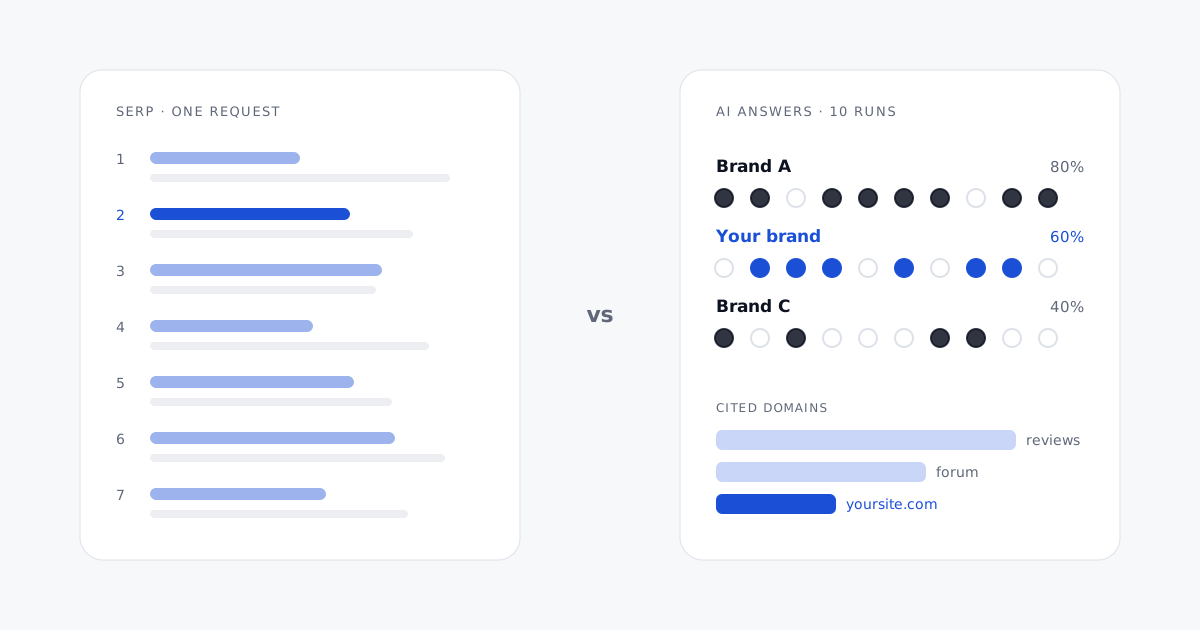
SERP tracking vs AI citation tracking: a technical breakdown
SERP tracking reads a typed list that barely moves; AI citation tracking reads generated text that changes on every run. What that changes in collection, parsing, sampling, storage and reporting.
Read the article →